

What is lock pages in memory option?
Lock pages in memory is a security setting that allows accounts to keep data in physical memory, instead of paging it to disk.
The policy lock pages in memory option is disabled by default.
Windows may negatively interfere with SQL Server by taking memory away.
How can I enable it?
Use the Windows Group Policy tool to enable this policy for the account used by the SQL Server Database Engine.
To enable it, follow the steps below:
- On the Start menu, click Run
- In the Open box, type gpedit.msc
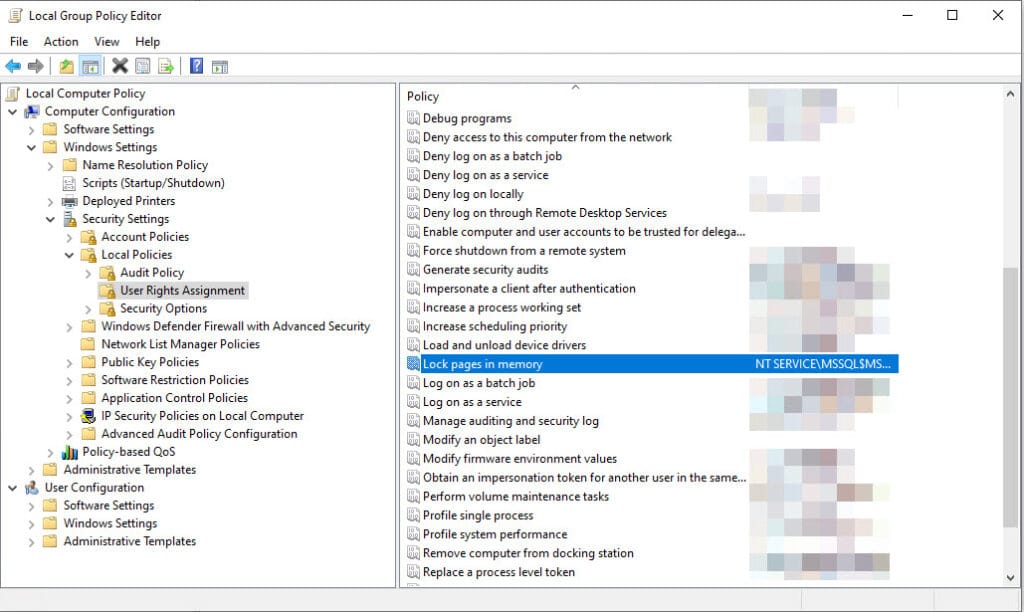
- On the Group Policy console, expand Computer Configuration
- Then expand Windows Settings
- Expand Security Settings
- Then expand Local Policies
- Select the User Rights Assignment folder
- In the pane, double-click Lock pages in memory
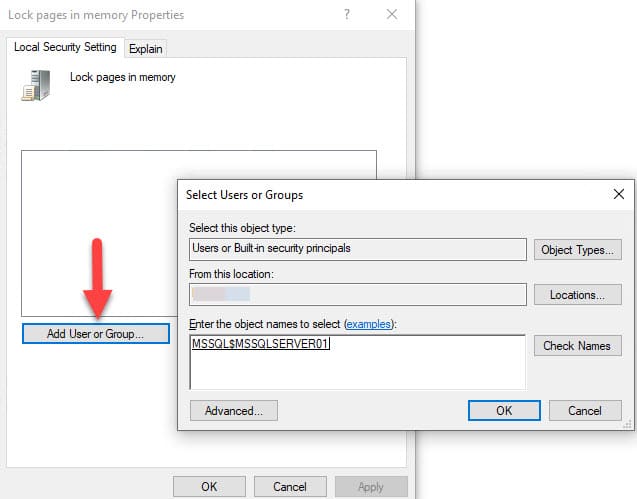
- In the Local Security Policy Setting dialog box, click Add
- In the Select Users or Groups dialog box, add an account with privileges to run sqlservr.exe
Notes:
- You must be a system administrator to change this policy.
- When using the lock pages in memory user right, Microsoft best practices recommend setting an upper limit for max server memory to avoid negative impacts of the performance.