

SQL Server Health Check

Best Windows Power Plan for Optimizing SQL Server Performance

Updated October 29, 20251 min read

CPU performance and Windows power plans

Usually, the balanced power plan is set by default, which is what Microsoft recommends for general use.

Great for saving the planet and being green, but it can be terrible for server performance.

The benefit of setting the server power management to high performance is for SQL Server to have consistent, predictable and high performance.

How to identify the issue?

On Windows Server 2008 and above, you can access the Power Options screen by typing powercfg.cpl in a Run prompt.
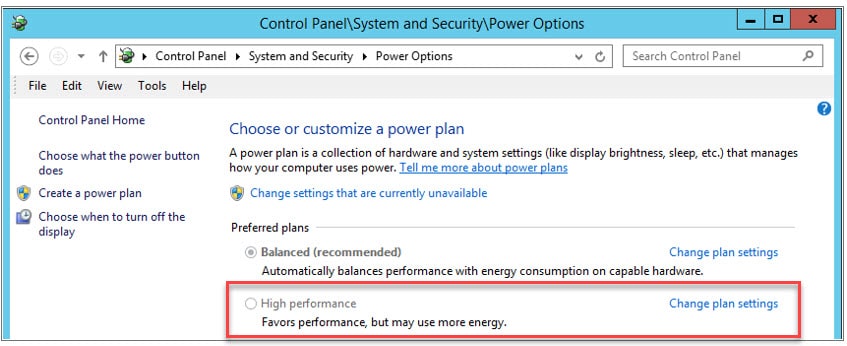
Figure 1 - Options of Windows power plans

How do I fix it?

  1. Set Windows power plan to High performance.
  2. Validate BIOS power management is disabled or set to OS control.

More information

Discover More

Discover what clients are saying about Red9

Red9 has incredible expertise both in SQL migration and performance tuning.

The single biggest benefit has been performance gains and tuning associated with migrating to AWS and a newer version of SQL Server with Always On clustering. Red9 was an integral part of this process.… The deep level of knowledge of MSSQL is incredible and the combined experience and expertise has been a huge asset.… Red9 was able to find a number of inefficient indexes and performance bottlenecks that resulted in over 400% improvement in latency.

Rich StaatsRich StaatsCloud EngineerMetalToad
See more testimonials
