

Why should you care about your build version of SQL Server?
There are known bugs and threats in specific build versions of SQL Server.
You may experience data corruption in the clustered indexes and high-security issues.
The online index rebuild can cause index corruption or data loss when it is used together with concurrent queries that modify many rows in specific builds of Microsoft SQL Server 2012 and Microsoft SQL Server 2014.
How to check it?
You can use the script below to check if you are using a dangerous build of SQL Server:
DECLARE @ProductVersion NVARCHAR(128)
	,@ProductVersionMajor DECIMAL(10, 2)
	,@ProductVersionMinor DECIMAL(10, 2)

SET @ProductVersion = CAST(SERVERPROPERTY('ProductVersion') AS NVARCHAR(128))

SELECT @ProductVersionMajor = SUBSTRING(@ProductVersion, 1, CHARINDEX('.', @ProductVersion) + 1)
	,@ProductVersionMinor = PARSENAME(CONVERT(VARCHAR(32), @ProductVersion), 2);

SELECT @ProductVersion AS YourSQLBuild
	,CASE
		WHEN (
				@ProductVersionMajor = 11
				AND @ProductVersionMinor >= 3000
				AND @ProductVersionMinor <= 3436
				)
			OR (
				@ProductVersionMajor = 11
				AND @ProductVersionMinor = 5058
				)
			OR (
				@ProductVersionMajor = 12
				AND @ProductVersionMinor >= 2000
				AND @ProductVersionMinor <= 2342
				)
			THEN 'Build with high risk of security'
		WHEN (
				@ProductVersionMajor = 10
				AND @ProductVersionMinor >= 5500
				AND @ProductVersionMinor <= 5512
				)
			OR (
				@ProductVersionMajor = 10
				AND @ProductVersionMinor >= 5750
				AND @ProductVersionMinor <= 5867
				)
			OR (
				@ProductVersionMajor = 10.5
				AND @ProductVersionMinor >= 4000
				AND @ProductVersionMinor <= 4017
				)
			OR (
				@ProductVersionMajor = 10.5
				AND @ProductVersionMinor >= 4251
				AND @ProductVersionMinor <= 4319
				)
			OR (
				@ProductVersionMajor = 11
				AND @ProductVersionMinor >= 3000
				AND @ProductVersionMinor <= 3129
				)
			OR (
				@ProductVersionMajor = 11
				AND @ProductVersionMinor >= 3300
				AND @ProductVersionMinor <= 3447
				)
			OR (
				@ProductVersionMajor = 12
				AND @ProductVersionMinor >= 2000
				AND @ProductVersionMinor <= 2253
				)
			OR (
				@ProductVersionMajor = 12
				AND @ProductVersionMinor >= 2300
				AND @ProductVersionMinor <= 2370
				)
			THEN 'Build with high risk of corruption'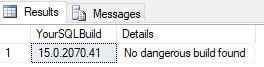
How to fix it?
- Install the latest service pack (SP) and latest cumulative update (CU) as soon as possible.
- If this can’t be done now, at least use MAXDOP=1 in index maintenance jobs (SQL Server Agent).
- Keep your SQL Server updated.